Which photocopier to choose? Find the ideal model in 2 minutes
Answer 3 simple questions, and our simulator recommends the model suited to your volume, format and budget, with a purchase or rental option.
Trouvez votre copieur idéal
Or request your quote and receive a response within 24h!
5 key points before reading
5 key points before reading
In summary
The monthly print volume is the number 1 criterion: choosing an undersized device doubles maintenance costs over 3 years.
A4 is enough for 80% of businesses: A3 is essential only for architecture, construction or visual marketing.
B&W costs 5 to 10 times less per page than colour: only choose colour if your activity really justifies it.
Rental beats buying on TCO for the majority of SMEs: from 25 €/month all-inclusive, without tying up cash flow.
Our simulator saves you 30 minutes of comparison: 5 questions, a personalised result, a free quote with no commitment.
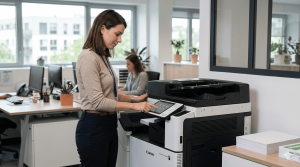
Why choosing a photocopier is crucial for your business
A poor photocopier choice is not immediately visible. It is paid for over time: wasted toner, frequent breakdowns, an overpriced maintenance contract, a machine that is saturated by the second year.
According to Gartner, businesses spend between 1 and 3% of their turnover on the print budget alone. An item that is often underestimated, and rarely optimised.
A poorly sized photocopier costs on average 30 to 40% more over 3 years: excessive toner consumption, premature wear of parts, technical interventions not provided for in the contract.
89% of IT decision-makers have observed an increase in printing costs over the last 12 to 18 months, while nearly half (45%) reported a decrease in print volumes. The main cause: poorly sized and unmanaged fleets.
The 3 classic mistakes made by SMEs:
The key criteria for choosing your professional photocopier
Monthly print volume: the number 1 criterion
It is the starting point of any choice. Regularly exceeding the recommended volume of a device means halving its lifespan and multiplying maintenance costs.
A3 or A4 format: what really changes
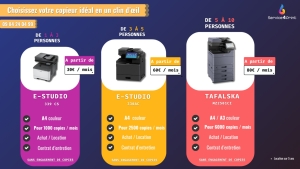
A4 is enough for 80% of businesses: office work, invoicing, letters, internal reports. It is the standard format, and A4 devices are cheaper both to buy and to use.
A3 becomes essential in certain sectors: architecture, construction, marketing, medical practices (radiology). If you produce plans, posters or large-format materials, A3 is not a luxury.
The A3/A4 multifunction offers total versatility. Its price is around 20% higher, but it avoids buying two devices.
Colour vs Black & White: when it’s worth the cost
Colour costs 5 to 10 times more per page. If 90% of your printing consists of internal documents, a B&W device will save you several hundred euros per year.
Multifunction or standalone printer?
A multifunction device combines: printing, scanning, copying, and optionally fax.
For a business of 3 people or more, the multifunction is almost always more cost-effective. It reduces the number of devices, centralises management and meets document scanning requirements.
Concrete B2B benefits:
- Direct scanning to your EDM (electronic document management)
- GDPR-compliant archiving: with the guidelines published at the end of 2025 by the CNIL, multifunction printers must be secured, audited and documented, like servers or cloud solutions.
- Reduction in the number of devices and maintenance contracts
Buying vs renting: the 3-year TCO comparison
Rental generally includes maintenance, consumables and equipment replacement. For an SME that wants to keep its budget under control without tying up capital, it is often the smartest option.
Calculate my TCO with an adviser →
Comparison of the best brands according to your profile
All the major brands are reliable. The right choice depends on your volume, your sector and your priorities (cost, colour quality, security, after-sales service).
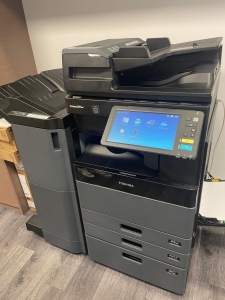
Service4Print is an approved reseller of all these brands, without exclusivity. We recommend only what matches your real need.
Buying or renting a photocopier: what to choose for your business?

Both options have their place. It all depends on your situation.
Flexible rental is ideal if you are:
- A startup or a growing business (needs that change quickly)
- An SME with a monthly budget to keep under control
- An organisation in hybrid mode (partial remote working, several sites)
Buying is relevant if you have:
- A stable and predictable print volume over 3 to 5 years
- Available cash flow and a wish to avoid a monthly commitment
- Very specific needs justifying bespoke equipment
Service4Print offers both options. No minimum commitment on rental: you choose the duration and the options according to your real situation.
Discover our flexible rental offers →
FAQ — Your questions about choosing a photocopier
Which photocopier for an SME of 10 people?
For a team of 10 people, a multifunction device covering 500 to 2,000 pages/month is generally sufficient. Colour or B&W depending on your activity. With rental, expect from 25 €/month all-inclusive. The Ricoh IM 2702 or Sharp MX-C304W models are well suited to this profile.
What is the difference between a photocopier and a multifunction printer?
Today, the two terms often refer to the same device. “Photocopier” is the historical term, from the era when copying was the main function. “Multifunction” is the current technical term: it describes a device that prints, scans, copies and sometimes faxes. Multifunction printers, which also combine scanning and photocopying functions, represent the largest share of units sold in both volume and value, around 90%.
What budget should you plan for a professional photocopier?
For purchase: expect between 800 and 8,000 € depending on the volume, the format and the functions. For rental: offers start at 25 €/month for a small volume, up to 150 €/month for a high-volume all-inclusive device (maintenance + consumables).
Is it better to buy or rent a photocopier?
For the majority of SMEs, rental offers a more controlled TCO and appreciable flexibility (upgrade possible, maintenance included). Buying remains relevant if your volume is stable over 3 to 5 years and you have the cash flow. When in doubt, our simulator helps you compare the two options based on your real situation.
How does the Service4Print simulator work?
The simulator asks 5 questions (volume, format, colour, functions, acquisition mode). A recommendation algorithm cross-references your answers with our catalogue and generates a personalised result. You then receive a free quote, with no commitment, directly tailored to your profile.
Useful sources
- CNIL – GDPR in practice: protecting your employees’ data: documentary security obligations applicable to professional printers.
- CNIL – Practical guide to personal data security (PDF): concrete recommendations on managing documents and access.
- Service-public.fr – GDPR obligations for businesses: complete legal framework on data protection in business.
- Républik Workplace – Printing costs in business: Epson study on the evolution of printing costs in a hybrid context.